
A Fidelity recurring investment automatically buys a dollar amount of a stock, ETF, mutual fund or Fidelity Basket Portfolio on a schedule you choose: weekly, every two weeks or monthly. Setup takes a few minutes, and you can change or cancel it at any time.
Fidelity recurring investments at a glance
| Detail | What Fidelity says |
|---|---|
| What you can buy | Stocks, ETFs, mutual funds and Fidelity Basket Portfolios |
| Amount per investment | $1 to $100,000 for stocks, ETFs and baskets; $10 to $100,000 for mutual funds (individual funds may set higher minimums) |
| Frequency | Weekly, every 2 weeks or monthly |
| Funding | Your Fidelity cash (core) position or a linked bank account |
| Eligible accounts | Brokerage and cash management accounts; traditional, rollover and Roth IRAs; HSAs |
| Investments per setup | Up to 10 symbols at a time |
| How orders fill | Stocks and ETFs are placed as market orders on the investment date; mutual funds fill at the next available price; a holiday or non-trading day moves the order to the next trading day |
How to Set Up a Recurring Investment on Fidelity
- Log in to your Fidelity account on Fidelity.com or in the Fidelity Mobile app.
- Under the Accounts & Trade tab, select Transfer.
- Choose Manage recurring transfers from the dropdown menu under the Transfer section.

- Select Create New Activity, then choose Investment.
- Pick a frequency: weekly, biweekly, or monthly, and set the date you want it to start.
- Choose the stocks, ETFs, mutual funds, or Basket Portfolio you want to invest in regularly, and set the dollar amount.
- Confirm the details to activate the plan. Fidelity will buy automatically on that schedule going forward.
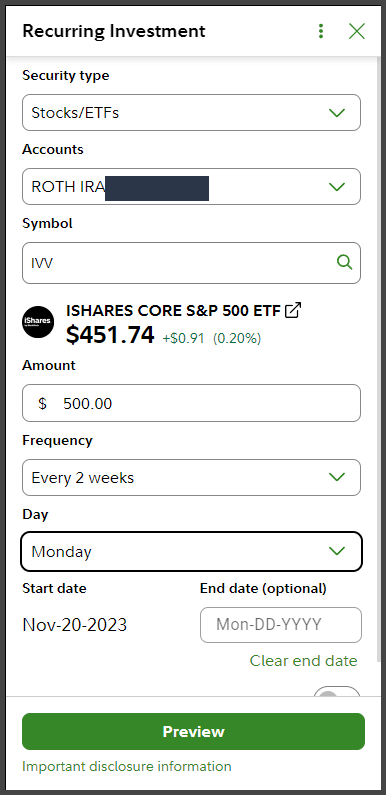
Fidelity’s own walkthrough also lets you start from Trade > Recurring Investment. Either way, you can add up to 10 symbols in one setup, and a toggle lets you pay from a linked bank account instead of your Fidelity cash balance. Fidelity renames menu items from time to time, so if a label looks different, follow Fidelity’s walkthrough linked in the sources below.
Recurring investment vs. recurring transfer vs. dividend reinvestment
These three get mixed up constantly, and they do different jobs.
| Feature | What it does | Where it comes from |
|---|---|---|
| Recurring investment | Buys a security on a schedule | Cash in your Fidelity account or a linked bank |
| Recurring transfer | Moves cash on a schedule between your bank and Fidelity, or between Fidelity accounts. It does not buy anything. | Your bank or another Fidelity account |
| Dividend reinvestment | Uses dividends you earn to buy more of the same holding | The holding’s own dividends |
If you want cash to arrive on a schedule and then be invested on a schedule, you set up both a recurring transfer and a recurring investment. We cover that pairing in Fidelity recurring deposit vs. recurring investment. For dividends, see how often Fidelity reinvests your dividends.
How to change or cancel a recurring investment
Fidelity states you can modify or cancel a recurring investment whenever you need to, from your account under Transfer > Manage recurring transfers. Step-by-step instructions, including how to find a plan you set up months ago, are in how to find, edit, pause or cancel Fidelity recurring investments.
Costs and caveats
Fidelity charges no commission on online US stock and ETF trades, with two exceptions it lists: Professional Equity Traders pay $0.001 per share, and a limited number of ETFs carry a $100 service fee. Mutual funds have their own fees and expenses, described in each fund’s prospectus. Investing a fixed amount on a schedule (dollar-cost averaging) does not assure a profit or protect against a loss in declining markets.
Frequently asked questions
What is the minimum for a Fidelity recurring investment?
$1 per investment for stocks, ETFs and Fidelity Basket Portfolios, and $10 for mutual funds. A specific fund can require more, so check its minimum before you schedule it.
Can I set up recurring investments in a Roth IRA or HSA?
Yes. Fidelity lists traditional, rollover and Roth IRAs and health savings accounts as eligible, along with brokerage and cash management accounts.
How many investments can I schedule at once?
Up to 10 symbols in one setup. You can create more than one setup.
When does a recurring investment actually run?
On the investment date you pick. Stock and ETF orders go in as market orders on that date, mutual fund orders fill at the next available price, and a holiday moves the order to the next trading day. Fidelity does not publish a time of day.
Is a recurring investment the same as reinvesting dividends?
No. A recurring investment buys with money you schedule. Dividend reinvestment buys more of a holding with the dividends that holding pays.
Related guides
- Best brokerages for automatic investing
- How to set an automatic sell at a certain price in Fidelity
- How to set automatic rebalancing of stocks on Fidelity
Sources, as of Oct 10, 2026: Fidelity recurring investments and Fidelity Learning Center: how to set up recurring investments. usefidelity.com is not affiliated with or endorsed by Fidelity Investments.